在制作页面动画时,我们可以通过定时器(setTimeout或setInterval)循环操作DOM节点来实现动画的效果.
但是Google 最佳JS实践要求使用requestAnimationFrame代替定时器.这是为什么呢?
原因有三个:
setTimeout\setInterval并不和JS在一个线程上,虽然你可以模拟浏览器刷新频率(1000/60),但如果JS线程执行时间较长,JS出超过这个时间去保存有setTimeout\setInterval回调的队列中拿回调执行.这个时候页面会出现卡顿的情况.- 在一些浏览器中,运行有
setTimeout\setInterval的脚本的页面,即使当前未被打开,定时器脚本依然是在后台运行的.这就浪费了计算机资源.
- 并不是所有的浏览器都是每秒60帧频率,所以
setTimeout\setInterval的定时时间需要适配设备.
用requestAnimationFrame就不会有上面这三个问题!
浏览器在每次重绘(repaint)之前,它都会先去执行requestAnimationFrame(callback)中的回调方法,所以它天生解决第1,3个问题.而当浏览器发现运行有requestAnimationFrame(callback)的页面在后台时,它会自动停止执行requestAnimationFrame(callback)中的回调,当它回到前台时又自动执行回调.
语法&兼容性
1
2
3
4
| var requestId = window.requestAnimationFrame(callback);
|
requestAnimationFrame只会执行一次,所以要实现连续的动画效果,需要在callback回调中调用它.
requestAnimationFrame也使用于Canvas、WebGL中动画绘制.
目前大部分浏览器都是完美支持requestAnimationFrame的.
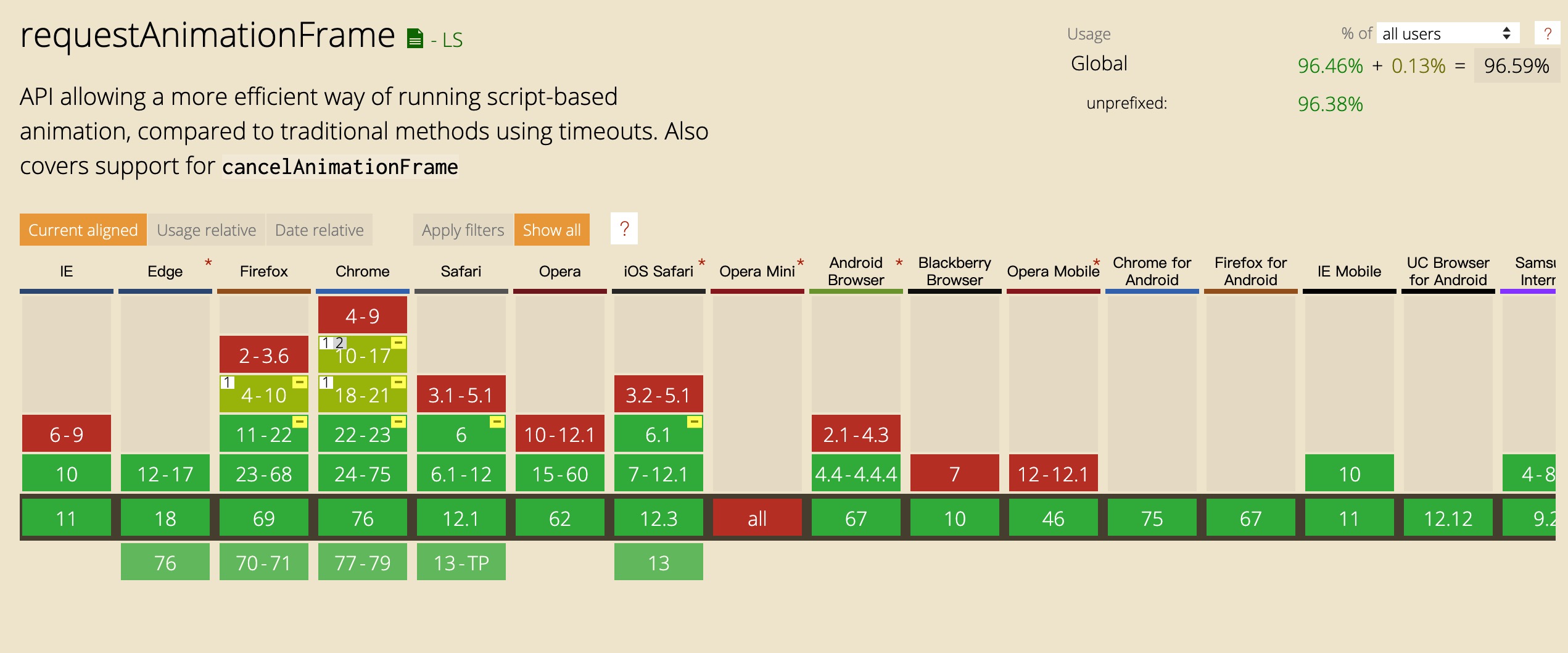
假如还有不兼容的,则就可以使用下面的polyfill👇
1
2
3
4
5
6
7
8
9
10
11
12
13
14
15
16
17
18
19
20
21
22
23
24
| (function() {
var lastTime = 0;
var vendors = ['webkit', 'moz'];
for(var x = 0; x < vendors.length && !window.requestAnimationFrame; ++x) {
window.requestAnimationFrame = window[vendors[x]+'RequestAnimationFrame'];
window.cancelAnimationFrame =
window[vendors[x]+'CancelAnimationFrame'] || window[vendors[x]+'CancelRequestAnimationFrame'];
}
if (!window.requestAnimationFrame)
window.requestAnimationFrame = function(callback, element) {
var currTime = new Date().getTime();
var timeToCall = Math.max(0, 16 - (currTime - lastTime));
var id = window.setTimeout(function() { callback(currTime + timeToCall); },
timeToCall);
lastTime = currTime + timeToCall;
return id;
};
if (!window.cancelAnimationFrame)
window.cancelAnimationFrame = function(id) {
clearTimeout(id);
};
}());
|
例子
1
2
3
4
5
6
7
8
9
10
11
12
13
14
15
16
17
18
19
20
21
22
23
24
25
26
27
| <!DOCTYPE html>
<title>Script-based animation using requestAnimationFrame</title>
<style>
div { position: absolute; left: 10px; padding: 50px;
background: crimson; color: white }
</style>
<script>
var requestId = 0;
function animate(time) {
document.getElementById("animated").style.left =
(time - animationStartTime) % 2000 / 4 + "px";
requestId = window.requestAnimationFrame(animate);
}
function start() {
animationStartTime = window.performance.now();
requestId = window.requestAnimationFrame(animate);
}
function stop() {
if (requestId)
window.cancelAnimationFrame(requestId);
requestId = 0;
}
</script>
<button onclick="start()">Click me to start!</button>
<button onclick="stop()">Click me to stop!</button>
<div id="animated">Hello there.</div>
|
上面👆代码运行效果
Future
requestAnimationFrame虽然好,但它是和JS运行在一个线程中的,如果它的回调耗时,会影响到整个JS执行效率的.
所以结合试验性apitransferControlToOffscreen,可以把动画操作放入 Web Worker中进行.
1
2
3
4
5
6
7
8
9
10
11
12
13
14
15
16
17
18
|
const offscreenCanvas = document.getElementById("c").transferControlToOffscreen();
worker.postMessage(offscreenCanvas, [offscreenCanvas]);
let ctx, pos = 0;
function draw(dt) {
ctx.clearRect(0, 0, 100, 100);
ctx.fillRect(pos, 0, 10, 10);
pos += 10 * dt;
requestAnimationFrame(draw);
}
self.onmessage = function(ev) {
const transferredCanvas = ev.data;
ctx = transferredCanvas.getContext("2d");
draw();
};
|
参考
https://html.spec.whatwg.org/multipage/imagebitmap-and-animations.html#animation-frames
https://www.w3.org/TR/animation-timing/#dom-windowanimationtiming-requestanimationframe
https://www.paulirish.com/2011/requestanimationframe-for-smart-animating/